Random Thoughts
Random Thoughts inside Alan's head
When I started a consulting company in 2006, I decided to use GnuCash for my business books, since I was already familiar with it from home use. It is very well-suited for business accounting, since it uses standard accounting terminology and double entry. When it was time to prepare my corporate taxes, I called my dad (an accountant) to explain basic business accounting to me… closing out the books for the year, and all that jazz. I really wanted to share my GnuCash file with him, but that was not possible, since he uses Windows.
Today, I discovered that GnuCash has been ported to Windows (since version 2.2.0 in August of 2007). This is HUGE. With the whole “interoperability” stumbling block out the way, small businesses have one more reason to use open source software like GnuCash and Linux. I imagine that soon, if not already, business owners will be able to send their GnuCash data files directly to their accountants, just like they do today with their QuickBooks files.
Today, in preparation for March 15th (tax day for corporations), I installed GnuCash on my dad’s Windows PC, and he took a look at my books.
GnuCash, FTW!
I do have one question, though. During the installation, the GnuCash installer mentioned something about “Installing Windows firewall rules.” That scares me a little. If you know why it does this, leave a comment below.
Today was dominated by two events.
Locally, we woke up to find the ground covered with three inches of snow. Our girls have not experienced too many snow days… the few times it has snowed in recent years, we only got a light dusting. This time, we had enough to enjoy a snowball fight and some disc sledding in our back yard.
On a national scale, we enjoyed watching President Obama’s inauguration (and equally as important, the orderly end of the Bush regime). Our new president had some powerful words to mark the event. For me, the most memorable line of his speech was: “As for our common defense, we reject as false the choice between our safety and our ideals.” I welcome our new president, and I look forward to participating in a new America.
My first exposure to computers was in 1981, when my neighbor “Howdy” (Howard) Petree showed me his family’s TRS-80 Color Computer. His dad gave me some sage advice: “do whatever you want to… you’re not going to break it”. I wrote a simple game called “Al-Zap”, which led the player through a series of scenarios, each followed by three choices: “(1) Eat it, (2) Shoot it, (3) Run away”. I kept the program on three hand-written pages on a note pad, and I manually re-entered it when I wanted to work on it some more.
My interest in computers continued, but I could not go bug Howdy every time I had the urge to tinker. That’s when my friend Greg Reid told me that the public library in downtown Winston-Salem had a lab with four Apple II computers. So my early years of computing were primarily spent hacking on the Apple II’s. Eventually, my dad bought one for our family.
The rest, as they say, is history.
This week, Jeff Mercer from the Triangle Linux User Group offered a working Apple II computer to whoever would come and take it off of his hands. I took Jeff’s offer, and I hooked the old computer up so I could show the girls what “old school” computing was like.
Audrey and I did a little bit of tinkering with Applesoft BASIC, and then I gave her an assignment: to print out a multiplication table. She worked on her FOR/NEXT loops, and soon she had a very nice looking 10×10 table of numbers.
I am very proud of her accomplishment, and even more proud that she took such an interest in her daddy’s past.
My friend Tim told me about a music service called “Pandora“, which is an internet radio station that runs in a flash applet in a web browser. You can suggest songs or artists, and vote songs up or down. It uses the the Music Genome Project to categorize music, and to add similar music to your playlists. It’s a pretty cool project.
However, I encountered problems when I ran it on my Asus Eee PC 900. Pandora seems to run fine by itself, but it pauses and skips if you are browsing in another window. I think it has to do with a combination of Firefox’s “AwesomeBar” and the Eee PC’s flash disk.
The Awesomebar is Firefox3’s new address bar that searches for matches among your bookmarks and the titles and URL’s from every web site you have visited recently. Since the Eee PC uses a solid state flash disk, disk writes are pretty slow. So when you are browsing, every time open a new page, Firefox 3 writes some stuff to its sqlite database of user history. It then calls fflush(), which flushes all writes (not just its own) to the disk. During this time, all browser activity halts until the writes are complete. Other applications keep running fine, but the browser rendering stops — often “graying out”, turning back-and-white until it starts responding again. The problem is, flash applets also pause, and that includes Pandora.
I considered a few solutions:
Combining a couple of these ideas, I wondered if I could run some sort of console-based streaming audio application on my server. It would be cool to hook up some speakers to bender and listen to internet radio.
It turns out that mplayer will do just that. For example:
mplayer http://wunc.org/about/listen.pls
And now we’re listening to our local NPR station!
Note – you’ll also want to install a utility to set the volume. I use alsamixer.
Of course, this does not solve the original problem of Pandora pausing. And there seems to be quite a frenzy on the Firefox bug tracker about flushing the history database.
But streaming audio from a headless server is a pretty neat idea, and one that may become a permanent fixture in my home office.
As we are all counting down to welcome in 2009, we should be reminded to wait just a second, to stop wishing our lives away.
At 7pm Eastern time (midnight UTC), the official international time-keeping standards body inserted a “leap second” into the normal stream of ordinary seconds.
This is done periodically to keep our standard clocks (UTC) in sync with “mean solar time”, which is based on the Earth’s position and rotation. If we did not do that, then Earth-related events such as midnight and noon would gradually shift to different times of the day (likewise, without leap days, the equinoxes and solstices would gradually shift through the year).
At home, I could witness this historic event in the logs of my Linux-based server, bender.
Dec 31 18:59:59 Clock: inserting leap second 23:59:60 UTC
How did YOU spend YOUR leap second?
My friend Tanner suggested that I am short-selling myself by not allowing others to add comments to my blog.
Since I started this blog as an experiment to familiarize myself with different types of content management software, it never occurred to me to open it up (in fact, I was surprised that anyone actually read it at all). My initial installation was “locked down” to reduce the potential avenues for spam.
So today, I turned on comments. It required a little bit of SQL tinkering to enable comments on past posts… I hope I did not mess anything up.
Let us know what you think.
The power was out at work this morning. We have massive generators to keep the labs powered, but the offices were in the dark. The whole building was filled with the beeping of dying UPS’s.
I spent most of Sunday trying to get a USB device to work under Windows XP, running inside of VirtualBox OSE on an Ubuntu host. I found lots of how-to’s, mostly involving permissions on /dev/bus/usb and /proc/bus/usb, and also comments about /etc/fstab. However, the part that was not inherently obvious was that VirtualBox OSE (the “Open Source Edition”) does not support USB. However, the non-OSE version does.
Again, VirtualBox OSE does not support USB.
So I downloaded the non-OSE version (actually, on Ubuntu, you can simply add a line to your apt sources file and use the normal apt tools to install it). Within minutes, my USB devices showed up. From what I understand, you do still need to make sure to mount /dev/bus/usb.
root@kimono:~$ grep vbox /etc/group
vboxusers:x:125:alan
root@kimono:~$ grep usb /etc/fstab
none  /proc/bus/usb  usbfs  devgid=125,devmode=664 0 0
root@kimono:~$ mount | grep usb
none on /proc/bus/usb type usbfs (rw,devgid=125,devmode=666)
root@kimono:~$
Earlier this year, my old faithful home server, “buster”, died. Buster was a hand-me-down 500 MHz Pentium III, and his role in my house was file server, print server, DHCP/DNS server, web server, router/firewall, VPN server and for a couple of years, a mail server. He also performed some odds and ends: turning on/off my Christmas tree lights via X10, emailing me every morning with birthday reminders, fetching RSS feeds, and processing updated geocache information into Palm and Lowrance GPS formats. In his last days, buster also filled a unique roll as a squid proxy, serving up an “upside down internet” on an open wireless network. It might have been this final task that drove him mad. His RAM was fried.
I hastily replaced buster with a WRT54g router, on which I tried both the Tomato and dd-wrt alternative firmwares. Both of them did a terrific job.
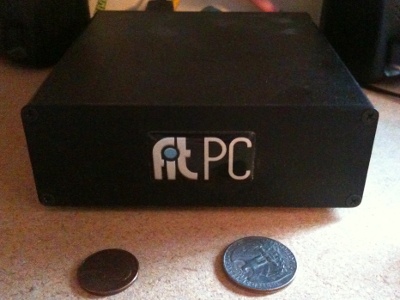
My modest Linux server
However, I still wanted a file server that could remain on 24 hours per day, one that I could store files on, and one that would share my printer. I also missed having a VPN. In short, I wanted a replacement for buster. However, what I did not want was a power-hungry box that made a lot of noise.
I finally settled on a Fit PC 1.0 (not to be confused with their newer model, the Fit PC slim. The Fit PC 1.0 has about the same specs that buster had: 500 MHz Geode, 256 MB of RAM, USB 2.0 ports. But what it does not have is a hungry power appetite. It uses only 3-5 watts of power! And it is fanless and silent.
I call this new Fit PC mini-server “bender”, and I look forward to working together with him.
I finally got a chance to ride a Segway.
We spent most of Saturday at the SciWorks museum in Winston-Salem. It’s a pretty cool museum, complete with a planetarium, animal exhibits, and lots of hands-on science exhibits.
While we were milling around, I ran into a guy who looked a little familiar… it was Carl Weston, who used to live down the street from me when I was a kid. He was working at SciWorks, and he was showing people how to ride the Segway. It was a little awkward and slow to get started, but not too hard. I even convinced Foong to take a spin.
By the way, I remember visiting this place about 30 years ago, back when it was called the “Nature Science Center”. Some of the original exhibits are still there, including the Foucault pendulum.