Random Thoughts inside Alan's head
geeky stuff
General topics that geeks like.
High-Altitude Balloon Launch (NSL-3)
16 years
by alan
in geeky stuff on 2010-09-26
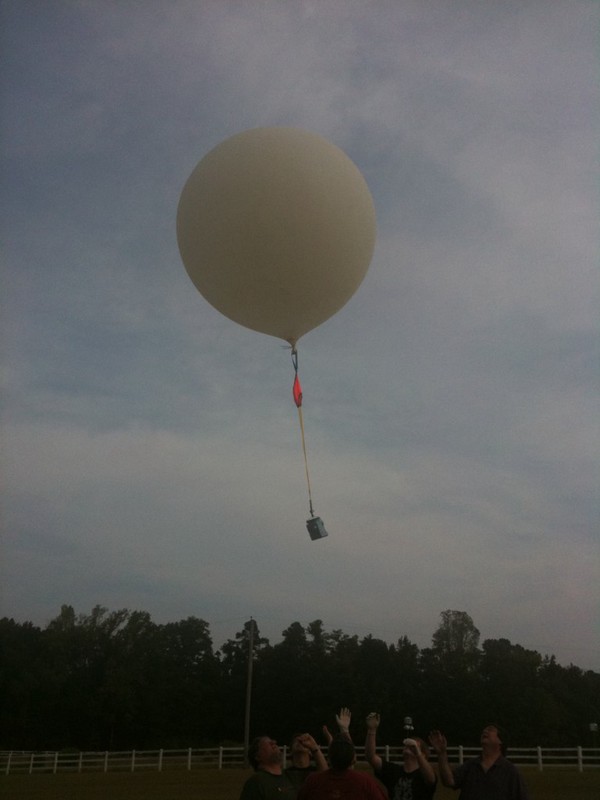 About a month ago, some friends found out about a contest called “Hackerspaces in Space”, where the object was to take a picture of the curvature of the Earth, with black sky over a band of blue. This kind of picture can only be taken from space… or from “near space”, above about 65,000 feet. That’s about twice as high as most passenger airliners fly! My friends quickly got together, declared themselves “NCNearSpace“, and researched everything from balloon physics to wind models to FAA regulations. Three weeks later, they launched two helium balloons up to about 80,000 feet. When they retrieved the capsules, they were rewarded with stunning photos.
The group was encouraged by their successes, and they sought out help in their next attempt, which would aim for a much higher altitude, hopefully 120,000 feet. This would require a much larger balloon. However, the team found that their earlier research had prepared them for this next launch — not much had changed, other than the sizes of the balloon and capsule.
One area that really needed some work was the recording and dissemination of position data. The first launch (dubbed “NSL-1”) was supposed to use a small GPS and a ham radio transmitter in a system called APRS. This system worked for a little while, but mysteriously stopped transmitting after 10,000 feet. They never heard from NSL-1’s transmitter again. Feeling rather bummed at the loss of their capsule, they hastily assembled a second launch using left-over parts and a SPOT GPS transceiver, a commercial unit and subscription service which is normally used by sailors, hikers, and mountain climbers. This second launch, NSL-2, did surprisingly well, considering its humble beginnings. The were able to follow the position using the SPOT web site, and they retrieved NSL-2 before the sun set. (About a week later, a farmer found NSL-1 and called the phone number, much to the delight of the team).
A week before the launch of NSL-3, I took a look at some scripts that had been used to retrieve the position data from the SPOT web site. Since the earlier chases had led the team through some very rural country areas, they found that it was not too easy to access the SPOT web site from the road. Furthermore, the SPOT web map required a full-sized PC with some pretty fancy web browser magic installed. It would be nice to get this information on a mobile phone. I did a little bit of hacking, and soon, I had a script that would:
- retrieve the data from the SPOT web site
- generate a small-format Google Map, which could be viewed on a smart phone
- send text messages to all of the followers (using a standard email list package)
- send an update to Twitter
- send an update to the ham radio APRS network
On the day of the NSL-3 launch, the system worked well. The use of SMS text messages proved to be a good way to get the balloon’s progress to the chase team. When we drove through no-coverage areas, the messages were queued up for us. And when we had 3G data coverage, we were able to see maps of the balloon’s path. For at-home followers, the Twitter feed kept sending out updates, and the Google Map was available.
As expected, the balloon went up, reporting its position for about an hour, from 8:55 until 9:40. Then, we stopped receiving updates while the balloon was above 60,000 feet (a known limitation of the SPOT). This uncomfortable time lasted about an hour and a half. Finally, at 11:10, we started getting updates again, and they continued for 35 minutes. After 11:45, all of the position updates were in the same place… some light woods next to a farmer’s cow pasture.
We were lucky… of all of the places to land, this terrain was not too rough. We got permission from the owner and then crossed the electric fence into the woods, where we found the capsule on the ground, about 40 feet away from a wide path. The balloon did not burst into many pieces as expected, but instead blew out on one side, leaving the flapping remains to get tangled in the parachute. Still, the capsule and its contents appeared to be undamaged.
The pictures were, once again, spectacular. But the on-board GPS data was inconclusive — it logged pressure altitude rather than GPS altitude, and even that data was cut off above 30,000 feet. So it’s hard to tell how high the balloon got (remember, NSL-3’s primary goal was to reach 120,000 feet). Our team will be digesting this data for a while… hopefully we can come up with an agreement on its burst altitude.
The team is thrilled with another successful launch and retrieval. And we already have plans for future projects. I have a feeling that there may be some data recording, logging and telemetry in my future.
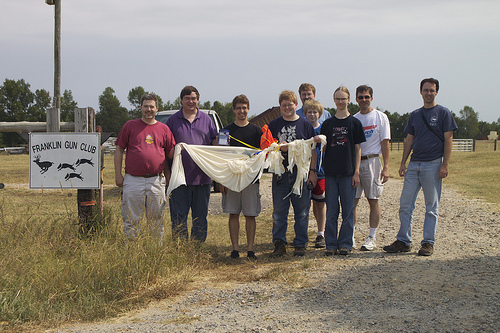
Photo by Adrian Likins
The Final Flight of Atlantis
16 years
When I was a kid, our family visited the Kennedy Space Center at Cape Canaveral in Florida. It must have been about 1977. When we were there, we learned about the soon-to-be-built Space Shuttle. I remember buying a deck of playing cards at the souvenir shop — they had an artist’s drawing of what the Space Shuttle was going to look like after it was complete. It seemed like science fiction.
The Space Shuttle program has been active now for three decades. And later this year, the fleet will be retired. With only three more scheduled missions remaining, our family decided to go see the final launch of Atlantis, mission STS-132.
Tickets were sold on the internet, but they always sell out very quickly. I was lucky enough to get SIX tickets to the Visitor Center. I was thrilled… except my friends were expecting me to get NINE tickets! We spent the next two weeks trying to make plans that fit within our new constraint. We decided that our family would use four tickets, and the other two would go to my friend David and his son, Chase.
THURSDAY
We took the girls out of school for two days (with the blessing of their principal), and we made the long ten-hour journey south. Scooby Doo kept us company in the van, and we occasionally checked for launch status updates and photos on Twitter — I was following a group called the “NASA Tweetup”, Twitter users who had been selected to go on an in-depth tour of KSC (it’s like the Charlie and the Chocolate Factory story, golden tickets for the super-special tour, but this one was for space geeks instead of sugar addicts).
We arrived in Titusville with a little bit of daylight left, which we used to scout out the area before finding our hotel way down in Melbourne. We had two full days at the Kennedy Space Center. The launch was on Friday afternoon, and Saturday was free to explore the exhibits.
FRIDAY
Traffic was heavy on the way in, but we finally got in and met up with David and his son. Along the way, our party had grown. David’s college room-mates had found tickets, so we now totaled nine.
We got off to a slow beginning, wandering around the Rocket Garden with no clue what to do first. But we finally decided to split into two groups. Our crowd wanted lunch, and that’s where we found the best bargain of the weekend: a plastic shuttle-shaped drink bottle with free refills. They cost $7 each, but they were worth every penny. It’s a super tacky souvenir that also keeps you hydrated in the Florida heat!
Lunch time was quickly turning into Launch time. At one point, I heard a loudspeaker announce “T minus ten minutes” and I panicked (before I realized that they do this awkward stopping and starting ritual). So we decided to survey the different viewing areas. The Visitor Center is close (7.4 miles), but it does not have a clear view of the launch pad, so they set up large TV screens in two different areas: one by the Explorer space shuttle mock-up, and one in an open field near the Rocket Garden. The TV’s give you a close-up view of the first few seconds after liftoff, and then you get a live view after the shuttle clears the tree line. Both of those areas were very crowded, and there were lots of trees that block the north-eastern sky.
We chose to forego the TV’s for a spot on the walkway behind the IMAX building. We were against the rail overlooking the pond, and that meant we had a clear view of the sky. I listened to my scanner to know what was going on. Audrey held binoculars, and I had a video camera. Foong and Sydney wandered to a shady spot that still had an open view.
Launch time came quickly… without the TV’s, it was easy for the time to sneak up. The next thing we knew, it was T minus 1 minute. I heard the countdown on the scanner reach zero, and then we waited for what seemed like 20 seconds before we saw a searing light shining through the trees. Atlantis finally popped up over the tree line, trailing behind it what looked like molten gold. The light was so bright, it was as if we were watching a movie of the blue sky, and someone had ripped a small hole in the screen, letting in the outside sunlight. It was very surreal.
As the spacecraft climbed, a helicopter circled over KSC, briefly crossing our view of the shuttle. Then came the sound, a low rumble that sounded like rolling thunder. Atlantis passed behind a small cloud, and continued up, building its pillar of smoke beneath it. Watching the smoke shoot out of the rockets and then hang in the air reminded me of the way you drip wet sand on a sand castle to make spires. It flows and then solidifies in place.
Within a couple minutes, Atlantis arched away from us, out over the Atlantic Ocean. Since we were at the bottom of that arc, we could not see the shuttle through the smoky trail. The solid rocket boosters were released, and so the smoke trail ended. When we saw the shuttle reappear, it was a tiny bright dot against the blue sky. It appeared to be heading downward as it curved its way over the ocean. Its straight downward path cut behind the twisted smoke trail that was beginning to be blown into a zig zag shape.
The scanner reported that Atlantis’s progress. It crossed the point of no return, where it could no longer return to Kennedy if needed. Then it was high enough to make its way into orbit even if one engine failed. Then it was high enough if TWO engines failed. Soon it reached 12,000 miles per hour. In just a couple of minutes, it had traveled 600 miles downrange… the same distance that we had spent all of Thursday driving.
Our attention slowly moved back to the ground. Wow. Those six astronauts were on their way into space. And we had been there to send them off.
We spent the rest of the day touring the Kennedy Space Center. We rode the shuttle simulator (which I would describe more as “cute” than “wild”). We saw an IMAX film about “Walking on the Moon”. And we spent a lot of time (and money) at the gift shop.
SATURDAY
As soon as we got back to KSC on Saturday, we went straight bus tour (well, OK, we did stop by the Orbit Cafe to fill those shuttle-shaped drink bottles). The bus tour made three stops.
The first stop was at an observation platform where you could see the Vehicle Assembly Building and the launch pad. This was a great photo spot, and we got to see a movie about how they assemble the “stack” (shuttle + tank + rockets) in preparation for launch.
The second stop was the Saturn V building, where we saw the actual Apollo launch control room, the humongous Saturn V rocket, and a movie about landing on the moon. We had lunch, did some exploring, and we touched a real moon rock.
The final stop on the bus tour was the International Space Station processing building. This place lacks the polish that the rest of the KSC has — it’s tucked away in the back of a drab federal government building, surrounded by chain link fence, and has a distinct “after-thought” feel to it. There are exhibits showing a history of orbiting labs, from Mir and Skylab to the modern ISS. But the main attraction was the mezzanine that overlooks the clean room where the ISS modules are assembled (during weekdays, I imagine).
We got back to the Visitor Center in time to catch one more IMAX movie, “Hubble 3D” (breathtaking). And then it was time to pry ourselves away and start driving north.
We drove as far as St Augustine and then found a hotel.
SUNDAY
Audrey had set a goal to dip her toes in the ocean while we were still in Florida, so we stopped by the St Augustine beach for a quick walk on the shore.
And after that, it was no nonsense for the next 600 miles. The girls did some homework in the car. Scooby Doo was noticeably absent.
To quote my friend Tanner, who saw the previous launch in April: “20 hours of driving. 8 minutes of excitement! TOTALLY worth it!!!” I’ll agree, but I have to add… the rest of the two days at KSC certainly helped tip the scales to the “totally worth it” side.
THE GOOD
- Endless refills on the tacky shuttle-shaped drink bottles.
- My favorite part of the tour, shuttle astronaut and NASA administrator, Charlie Bolden’s narration of the Shuttle Launch Experience.
- The hospitality of the KSC staff.
- The local ham club, who retransmits NASA launch info on their repeater.
- The kind strangers on Twitter (@Redshift42 & @ageekmom) who hooked us up with one last ticket.
THE BAD
- The two viewing places with the TV screens did not have a good view of the sky.
- The non-standard headphone jack on my Yaesu radio meant I had to hold the scanner up to my ear… plugging in the ipod earbuds caused it to transmit continuously!
THE UGLY
- That ISS Building could really use a make-over.
Countdown
16 years
by alan
in geeky stuff on 2010-05-14
I don’t normally post song lyrics to my blog. But today is a pretty special day for me, and I think Rush captured the spirit pretty well with their song “Countdown”, from their Signals album, which was released in 1982.
Countdown
by Rush
from “Signals”, 1982
Lit up with anticipation
We arrive at the launching site
The sky is still dark, nearing dawn
On the Florida coastlineCircling choppers slash the night
With roving searchlight beams
This magic day when super-science
Mingles with the bright stuff of dreamsFloodlit in the hazy distance
The star of this unearthly show
Venting vapours, like the breath
Of a sleeping white dragonCrackling speakers, voices tense
Resume the final count
All systems check, T minus nine
As the sun and the drama start to mountThe air is charged — a humid, motionless mass
The crowds and the cameras,
The cars full of spectators pass
Excitement so thick, you could cut it with a knife
Technology high, on the leading edge of life~
The earth beneath us starts to tremble
With the spreading of a low black cloud
A thunderous roar shakes the air
Like the whole world explodingScorching blast of golden fire
As it slowly leaves the ground
It tears away with a mighty force
The air is shattered by the awesome sound~
Like a pillar of cloud, the smoke lingers
High in the air
In fascination
With the eyes of the world, we stare.
CarolinaCon – Day 3
17 years
After Hacker Trivia last night, it was pretty hard to wind down and get to sleep. So 10am arrived quickly.
The Art of Software Destruction – Joshua Morin and Terron Williams
I missed this talk due to Daylight Saving Time… yeah, that’s it.
Apparenly, the topic was fuzzing, or throwing unexpected data at a system’s inputs to see how it handles them.
Why Linux is Bad For Business – Wesley Shields
Wes tried to raise the hackles of the Linux users in the audience with his provocative title and his confrontational style. However, his point was driven home very well. Many companies flock to Linux when they want to build on a base of a community-supported project. However, there are other alternatives that might be a much better fit to their development and deployment plans. FreeBSD has a very business-friendly license, which does not require re-contribution of a company’s changes (which may be their special sauce).
Wes makes a very compelling argument. While I appreciate his conclusion, I disagree with one of his premises: that anyone who is building an appliance will probably be making their changes to the kernel, and not in user space. That was true for him, since he was building a “networking appliance”, and the best place for fast networking logic is in kernel space. However, I have also developed a Linux-based “appliance“. But our secret sauce was in the application, and not in the networking or driver layers. So for us, the underlying kernel and support packages were just commodities.
Nits aside, Wesley’s talk was more thought-provoking than just provoking. And your author will certainly consider FreeBSD on his next project that requires an open source base.
Sorry, Wes. If you were trying to come across as a jerk, you failed. Great talk!
The Evolution of Social Engineering – Chris Silvers and Dawn Perry
These guys have entirely too much fun at their jobs. They are security consultants who specialize in penetration testing in the physical realm. That is, they break into office buildings. Well, that’s not really true. People let them in — they con their way into office buildings.
Chris and Dawn shared lots of stories about the many jobs they have been on, explaining along the way the rules of engagement, how they are hired by management, what they are trying to prove, and how far they’ll go to exploit the helpfulness of others.
One hour was simply not enough for these guys!
Metasploit – Ryan Linn
Man, I should have taped this talk.
Ryan gave us a very fast-paced hands-on demonstration of Metaspoit (as run from the Backtrack 4 Live CD), and the many ways that a target box can be probed and PWNED. He covered the msfconsole, meterpreter, automation of exploits, and generating malicious payloads.
This talk wins the “most informative” award from me. Very good stuff.
How the Droid Was Rooted – Michael Goffin
Michael shared his experience working with team that rooted the Motorola Droid phone (hint for developers, putting the phrase “this could be exploited” in the comments of your open-source code sort of acts like a neon sign that says “HACKERS WELCOME”).
There was a lot of good technical content, explaining how the Droid software is packaged and upgraded. But just as interesting was his account of the team dynamics. When one member decided to take the entire team’s marbles and go home, it really did not slow them down, because they were using a distributed source code control system (Mercurial). That meant that every team member had a complete copy of the source code repository. Lesson learned.
At the end of this talk, I wondered how long it would be before you could buy smart phones directly from the carrier that had root access, straight out of the box (after all, I have root access to my PC’s and PDA’s). Having worked for a cellular phone manufacturer, I would guess that we may never see that day. So, give a big thanks to Michael and his team for their hard work!
Protecting Systems Through Log Management and System Integrity – David Burt
This talk was, by far, the worst of the show.
David did not seem to have a core message… instead, he had hastily thrown together 86 slides worth of screen shots and raw data about logging tools. On the stage, he struggled to speed-read his way through the slides, speeding up even more when he hit the 5 minute warning. 75 minutes into his one-hour talk, though, David’s message started to shine through. He knows a lot about logging — and he is available for consulting work.
Wrap-up
We wrapped up with some prize give-aways… youngest attendee, oldest attendee, drunkest attendee, winner of a rock-scissors-paper showdown, that guy who looks like some other famous guy, and anyone else who will take this junk.
And that’s it, the show is over.
Mad props to the CarolinaCon Group, organizers, sponsors and volunteers. I had a great time, and I learned a lot. And it looked like most of the other 176 attendees did as well.
Now let’s see how much trouble we can get into between now and CarolinaCon 7!
CarolinaCon – Day 2
17 years
The second day of CarolinaCon was packed from sunup to sundown — who am I kidding… hackers seldom rise before noon. The festivities started at 10am.
Hacking with the iPhone – snide
No, not hacking the iPhone… but using the iPhone as a hacking tool. This talk was a good slide into the morning, a chance to let the coffee sink in. It could probably summarized with two main points:
- Since the iPhone OS is a distant cousin of BSD Unix, many open source (Linux) networking tools can easily be ported to run on it, so a jailbroken iPhone makes a decent platform for network sniffing and the like.
- A jailbroken iPhone provides a behind-the-scenes look at the user interface, and many things that are set on the main GUI can be changed by directly manipulating the underlying settings files.
Neither of these ideas is too surprising, and so this talk was nothing new. Still, for me, having never played with a jailbroken iPhone (honest), it was an eye-opening experience. Or maybe that was just the coffee kicking in.
We Don’t Need No Stinking Badges – Shawn Merdinger
Shawn has spent some time evaluating campus-oriented badge reader door locks from a company called S2 Security. He showed how they work, and how they are advertised to work — not necessarily the same thing. An interesting glimpse into the world of distributed security systems, with several take-home lessons about what not to do.
It’s a Feature, Not a Vulnerability – Deral Heiland
This is the third time that I have seen Deral present at CarolinaCon. In 2009, he showed us what a mistake it can be to “web-enable” your products, and in 2008, he showed us how he made friends at Symantec with “Format String Vulnerabilities 101”.
This time, he continued his endorsement of Symantec’s products by demonstrating how their AMS product conveniently allows very easy access to a machine’s resources. In fact, all it takes is a single packet to tell AMS to run any command on a target Windows box. That’s convenient! (PWNED)
Smart People, Stupid Emails – Margaret McDonald
Margaret came here all the way from Denver to tell us what we already knew… that otherwise intelligent people send the stupidest things in email. This was a lively discussion that we could all relate to… yet I have this sinking feeling that our inboxes will still be filled with garbage when we get back to work on Monday.
Mitigating Attacks with Existing Network Infrastructure – Omar Santos
Omar was cursed with the dreaded 3:00 time slot… just in time for the after-lunch sleepies. It did not help that his presentation was JAM-PACKED with very technical networking information. So, for the most part, I sort of zoned out during this very informative presentation.
I tried hard to stay awake by asking a question (about “bogons” — in this case, the newly-allocated and unfortunately-numbered 1.0.0.0/8 address space). But it did not help.
Omar plans to give this same talk at “Hack in the Box” in Dubai later this year. So if I start feeling regrets that I missed something, I guess I can always book a flight.
OMG, The World Has Come To An End! – Felonious Fish
Hackers are usually prepared for anything… or are they? FF led a discussion on survival, what is needed when the rest of our infrastructure is gone. We might have food and water and shelter, but when my iPhone battery dies, it’s game over!
You Spent All That Money and You Still Got Owned – Joe McCray
Joe’s talk was one of the highlights of the Con… even Stevie Wonder could see that it was awesome. Joe told us his secret to success — he goes into companies, totally pwns them in short order, tells them how they suck, and then they pay him.
Apparently, corporate America makes Joe’s job very easy by following the worst practices. And on the odd chance that they have their operational act together, he can always solicit a security slip-up by sending them a carefully-crafted email (pwn), or if that fails, by leaving a CD with provocative title for some nosy employee to find (serious PWN).
What a life Joe leads — that “education” he got in prison has really paid off.
Locks: Past, Picking and Future – squ33k
The lovely and talented squ33k — 5th grade teacher by day, lock hacker by night — educated us on all things lock-related. With assistance from the TOOOL crew, she taught us how modern pin tumbler locks work, and how they can be picked. But being a full-time teacher, she made sure to frame her talk with some interesting background info on locks from as far back as 4000 years ago, and a glimpse into what locks may be like in the future.
I am so proud that our youngsters are learning their skills and attitudes from this woman. She’s a girl geek role model!
Hacker Trivia
What’s that? Al was spotted in parking lot? Someone allowed him back into the country? I thought that call to the TSA would be enough to keep him detained in the airport until the Con was over. I guess not. HE’S BACK!
Once again, Al Strowger took the stage and led us in a game of Hacker Trivia. Loosely based on Jeopardy!, this game quizzed the inebriated audience on the topics of: Movie Quotes, x86 instructions, other (hacker) conferences, math, 2009 tech, and ccTLD’s. John “Math for 400” Davis took home first prize, an iTunes gift card. Many other contestants won spot-prizes: hacking books, some new geek toys, donated “vintage” equipment, Vic Vandal’s old CarolinaCon 3 t-shirt, and lots of cupcakes.
Good night everybody. Sleep well, we’ll see you at 10am tomorrow morning!
CarolinaCon – Day 1
17 years
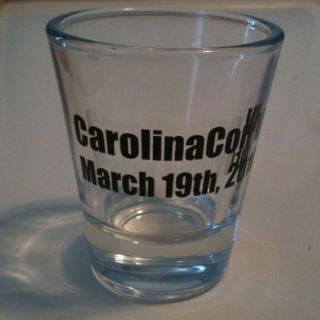
It’s that time of year again… time for the annual CarolinaCon security conference. This year promises to be bigger and better than last year — it has expanded from 1.5 days to 2.5 days, and it has moved from the somewhat undistinguished Holiday Inn in Chapel Hill to the somewhat less undistinguished Holiday Inn in Raleigh.
Notably missing was the “Master” of masters of ceremonies, Al Strowger. But Vic Vandal and his cohorts seemed to have the show in order. Personally, I can’t imagine a Con without the provocative charms of Al. But we’ll see how they do.
As usual, the Con started with a short after-work session on Friday night. There were three presentations to get the crowd warmed up.
Cybercrime and the Law Enforcement Response – Thomas Holt, a.k.a. Professor Farnsworth
The good professor never disappoints, and he really had a challenge this time, to warm up an otherwise un-primed crowd. He dove right in, with the not-so-statistically-significant results of a survey of state and local law enforcement officers, asking about their experience with computer crime. It was not surprising to find that most LEO’s were not very well versed in the specifics of computer-based crime, but they had a pretty good appreciation for the concepts. Thank you, CSI. Many trends and prejudices were revealed, and Dr Holt and members of the audience supposed several reasons why these might be so.
The Search for the Ultimate Handcuff Key – Deviant Ollam
If the crowd was not warmed up before Deviant Ollam took the stage, they certainly were after. He and the TOOOL team showed how handcuffs work, and how they can be defeated, sometimes with simple items like a piece of notebook paper!
But just as important as the actual material they presented, was the chosen format of their presentation. In true CarolinaCon fashion, they began by mixing a pitcher of their beverage of choice… tonight’s choice was a “Stone Fence” (one part Apple Jack, three parts hard apple cider, and a splash of bitters). Every time something in their presentation went unexpectedly, they would take a drink — this rule was strictly enforced by the audience.
In case that was not interesting enough, each live demonstration of handcuff picking techniques was accompanied by background music from a famous X-rated movie from the 1970’s and 80’s. In many cases, an audience member was able to “name that movie” before the lock-picker had freed himself, thus winning a prize.
Now this is the CarolinaCon that I came to see.
Microcontrollers 101 – Nick Fury
Finally, Nick showed the audience how to think small… he introduced the AVR microprocessor and the “Arduino” board and tools. Then he showed a few demos of what a small board like that can do. Certainly a tool that many hackers can add to their toolbox.
–
With these three presentations, the Con begins. We’re looking forward to Day 2, which brings a full day of hacking. See you at 10am.
Snakes of a feather
17 years
This time last year, Audrey wrote a computer program in BASIC. Someone had loaned us an Apple II computer, and I showed her what computers were like when I was a kid. I wanted her to write a program, and her mother decided that printing a 10 x 10 multiplication table would be a suitable challenge. So Audrey rose to the task.
This year, I decided to repeat the lesson with Sydney. However, our two girls are very different in personality and interests, and so we had to choose a different approach.
Audrey was motivated by her interest in history, and in learning how Daddy became a nerd. Sydney was motivated by attaching a prize to the assignment — a “feather” on her Indian Princess vest. This would count as one of our father-daughter “crafts”.
I also decided that since I did not have the lead-in of the Apple II computer, I could use any language, and not just BASIC. I went out on a limb and chose Python.
Sydney followed along as we talked about variables and loops, but she was not nearly as engaged as Audrey had been. In her defense, I think the idea of line numbers in BASIC is a little easier for a kid to grasp than the indented blocks of Python. And although formatting the output is easier in Python, all of that punctuation was sure to blow a few fuses in that young mind.
In the end, however, she produced a nice multiplication table.
Here’s her program.
#!/usr/bin/python
import sys

# top line of numbers
print "      " ,
x = 1
while x <= 10:
   print "%3d" % (x) ,
   x = x+1
print ""

# top line of dashes
print "      " ,
x = 1
while x <= 10:
   print "---" ,
   x = x+1
print ""

# ten rows
s = 1
while s <= 10:
   # each row is here
   print "  %2d |" % (s) ,
   x = 1
   while x <= 10:
      print "%3d" % (x*s) ,
      x = x+1
   print ""
   s = s+1
print ""
And here’s what the output looks like:
         1   2   3   4   5   6   7   8   9  10
       --- --- --- --- --- --- --- --- --- ---
   1 |   1   2   3   4   5   6   7   8   9  10
   2 |   2   4   6   8  10  12  14  16  18  20
   3 |   3   6   9  12  15  18  21  24  27  30
   4 |   4   8  12  16  20  24  28  32  36  40
   5 |   5  10  15  20  25  30  35  40  45  50
   6 |   6  12  18  24  30  36  42  48  54  60
   7 |   7  14  21  28  35  42  49  56  63  70
   8 |   8  16  24  32  40  48  56  64  72  80
   9 |   9  18  27  36  45  54  63  72  81  90
  10 |  10  20  30  40  50  60  70  80  90 100
Two days later, Sydney got to show her program to the girls in her Indian Princess tribe. Needless to say, there were some raised eyebrows coming from some of the dads at that meeting.
2009, a year of trying “new things” online
17 years
At the beginning of 2009, I made a New Year’s resolution, of sorts, to try new things online throughout this year. Specifically, I wanted to crawl out of my curmudgeon cave and try new services like online banking — things that had worked “well enough” in my old way, but that might be really cool once I opened up to them. Now that 2009 is over, I would like to report on my findings.
Online Banking
The first area that I wanted to expand my horizons was online banking. This can be a leap of faith, since financial stuff is very important, and since I already had a pretty good system for making sure things got paid on time and for keeping track of finances.
I converted most of my monthly bills into “paperless” billing, and I opened a new bank account that offered a relatively high interest rate in return for being totally paperless. I abandoned my paper filing cabinet in favor of an encrypted thumb drive. I replaced the “bill box” at home with a set of email folders that let me know which bills were in the queue, and which ones had already been paid.
For the most part, this system has worked very well. But there were a few hiccups. For example, one credit card company does not send me an electronic statement if my credit card balance is zero. That makes it hard to tell whether I am paid in full, or if I might have forgotten to download a statement. Also, I do not get email reminders from our city (my last remaining paper bill) when my water/trash bill is due.
Some banks and billers make the process easy, while others stand in your way. For example, my utility (gas and power) bills are sent directly to my bank, where I can pay them. However, to get my credit card company to send their bills directly to my bank, I have to give my bank the login credentials for my credit card company. BUZZ — I don’t play that game. There needs to be some other kind of authorization… like the way that domain transfers are handled, making the request on one side and validating the request on the other side.
There are also some “work flow” glitches. When downloading statements, some banks and billers pop up a “save as” box with a sensible filename filled in, like “Statement-2009-11-05.pdf”. Other billers populate the filename box with something not-so-helpful, like “billdisplay.asp”. Most offer PDF files, but a couple just show you a web page, and it’s up to you to “print to PDF”. I also had to choose how I was going to distinguish between (1) downloaded-but-unpaid, (2) paid-but-not-reconciled, and (3) reconciled bills. Little details like this can make online bill-paying either easy or maddening. But after a month or two, I had developed a new routine that works pretty well.
The one thing I am still getting used to — I end up with a bunch of windows open on the computer: GnuCash, bank web site, biller web site, file browser looking at PDF files, PDF viewer, email client with bill reminders.
Gadgets
I had my eye on the iPhone for a while, and I decided that when my Verizon contract expired, I was going to get one. By chance, I started shopping right as the iPhone 3GS came out, so I snatched one up, and I completely love it. It’s a game changer. It’s the sort of “nerd-vana” always-on network device that I had been wishing Ericsson could develop when I worked there.
A month later, I bought the ultimate iPhone accessory: a Mac Mini. I was hoping to learn how to write applications for the iPhone and iPod Touch. The Apple development tools, of course, run on the Mac.
Social Networking
I have always been a little suspicious of companies like LinkedIn that offer services where you can “build your network” of friends online. It’s just creepy… I feel like I am just feeding the marketing machine.
However, in spite of this, in 2009 I decided to take off all of my clothes and jump into the social networking pool.
I started with Twitter, which immediately appealed to me, with its minimalist design and its non-mutual “following” model. Next came the supposedly-professional LinkedIn and it’s more frivolous (and “fun”) cousin, Facebook. I also experimented with location-based services such as FourSquare and Gowalla, but these did not immediately “stick” with me.
I think the tipping point for me was during our trip to Malaysia. I really enjoyed taking photos with my iPhone and then posting them to Facebook immediately.
Online Services
My paranoia against the gatherers of information extends to the cat-daddy of them all: Google. But this year, I decided that these guys really are offering cool services that I would like to participate in.
So I got a Google Voice phone number, and a Google Wave account.
In 2009, I never got around to posting to Flickr or Youtube, although I had planned to.
Programming Languages
I had been feeling a little stale in my work, so I decided to teach myself a new programming language. I spent a couple of days reading through intro slides to Python, and then I wrote a small program to keep track of a “to do” list. It does not sound like much, but I used this one program as an exercise to learn about model-view-controller architecture, “curses” programming (full-screen windows and boxes on a text-based console), and SQLite (a small embedded database library) as well as the Python language itself.
The staleness at work did not last long. I was asked to help out with a new web application project, so I had to become an instant expert in Javascript and PHP, as well as Zend (a web app framework) and dojo (a set of Javascript widgets that can be used on a web page). Along the way, I also picked up a fair amount of CSS (cascading style sheets, which dictate how a web page is supposed to be laid out on the screen).
Shortly after I bought the iPhone, I wanted to learn how to develop applications for it. So I joined the Apple Developer Program, and I studied Objective C and the Apple development tools (Xcode and Interface Builder) by watching the video courses from Stanford University. After a few weeks, I was ready to write and publish a simple iPhone app called “Tipster”.
New Media
One unintended consequence of getting an iPhone was that I now had a very capable video iPod. So I subscribed to a couple of audio podcasts, so I could have some music to chill to at work.
After a while, I discovered video podcasts as well. I am totally hooked, and I have a backlog of TED.com videos I want to watch.
For fun, Sydney and I produced an audio recording that we referred to as “a podcast”, even though it was delivered to her friends on CD’s. But over the holidays, I decided to learn how to publish a podcast by uploading our audio file to my web server, and then by adding a simple XML index file.
Productivity and Sharing
For years, I have carried a small lab notebook at work. It’s where I keep notes, such as what I did each day, tips and tricks, lab set-up, and administrative details. This year, I replaced my paper lab notebook with a Tiddlywiki, a small one-file wiki that I can carry on a thumb drive. It allows me to easily search for key words, share with others via a web server, and keep multiple copies… and it’s smaller and more durable than my paper notebook, too.
And finally, although I have been publishing the “Porter Family News” every month for ten years now, I decided to supplement it with a WordPress blog. This has been my place to give opinions and observations, and to share tips and tricks with the world.
Overall, I am very pleased with where 2009 has taken me. At times, I had to remind myself to keep an open mind. But I have encountered, and embraced, many changes this year.
Cell phone voice mail “hack” (customization)
17 years
This weekend, I was playing with ring tones, and so I called my iPhone several times to test them out. I started wondering how long it took before my unanswered calls were redirected to voice mail. So I timed it.
By default, it appears that AT&T sets that delay to 25 seconds.
When I worked at Ericsson (1998-2003), I collected a bag of tricks that I used to customize certain features of my phone and my Cingular account. It turns out that some of these tricks still work today. One of those tricks was to set that voice mail delay to a longer value by using the GSM “star” codes.
The wise folks that created the GSM cellular standard understood that some people might have an older phone, but that they might want to use newer network features.
For example, remember the “bag phone” that people used in the early 1990’s? Or the Motorola “brick”? Those had simple calculator-style displays. The did not have a “voice mail” menu… all they could display was numbers! However, the guy at the phone store could program a brick phone to forward unanswered calls to voice mail after a certain delay. Or he could turn on call forwarding. In fact, he is actually telling the BASE STATION to forward unanswered calls, since that’s the piece of equipment that handles that job. After all, the phone itself might be turned off, or have a dead battery, or it might be in Africa somewhere.
It turns out that most features of the GSM network can be accessed using a series of digits dialed into the keypad. The sequence for call forward on no answer is **61*(target number)*11*(seconds)#.
If you typed that sequence into the old Motorola “brick”, a message would be sent to the base station to say “forward my phone calls to the following number if I do not answer within a certain number of seconds”. That same star code works on a modern phone as well.
This is also how “smart” phones work — the user interface runs on a PDA-like device, and star codes are sent over a serial line to the “GSM modem module”, a completely separate phone-on-a-chip that does nothing but handle the phone calls.
Here’s what it looked like when I customized my voice mail delay from my iPhone. First, I dialed the star code to see what my current voice mail setting was. That code is *#61#.
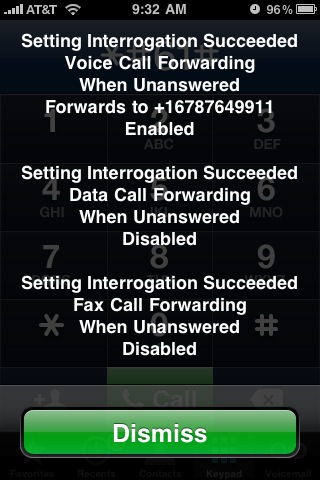
I wrote down the voice mail number — this is the number for AT&T’s voice mail system. Then I dialed **61*+1xxxyyyzzzz*11*10# to see if it would change my “call forward on no answer” delay to 10 seconds.
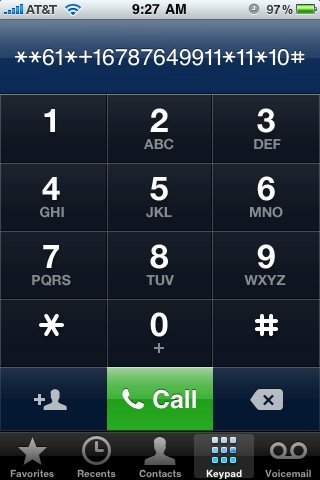
And I got this confirmation screen.
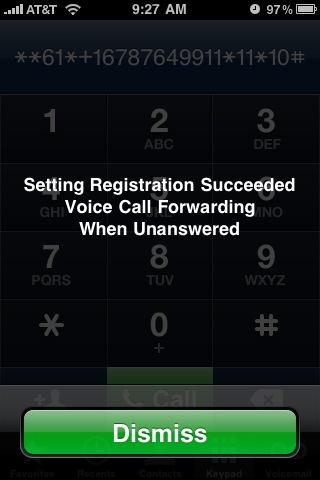
Then I called my iPhone. Sure enough, after 10 seconds, my call was routed to voice mail.
Of course, 10 seconds is too short — I used that number as a test. So I repeated the process to set the delay to a more reasonable 30 seconds.
A couple of important points:
- This is not hacking. This is a documented feature of GSM cellular networks, and it is exactly what happens behind the scenes when you enter a phone number in the “voice mail” menu of a cellular phone. The only difference is that the menu uses a hard-coded delay value, whereas you can set your own delay if you enter the command manually.
- This process should work on any GSM phone, not just on the iPhone.
Happy @1234567890
18 years
Computers usually tell time by counting the number of seconds since a certain “epoch” time. Then, before displaying the time to you, they do all of the crazy math that defines days of the year and leap years, and even time zones daylight savings time. On Linux systems, the “epoch” is midnight on January 1st, 1970.
At any time, you can tell how many seconds have passed since the epoch by typing:
date +%s
Tonight, at 6:31:30 pm local time, we reached a magic moment when the date was exactly 1234567890 seconds since epoch.
I took this opportunity to show the kids how computers keep track of the time, and to explain time zones (even though they are comfortable with the fact that is it morning in Malaysia when it’s evening here, they did not know about time zones). At the magic moment, we took time out from our pizza supper to watch the time change on my laptop.