Random Thoughts
Random Thoughts inside Alan's head
A while back, I ordered a couple of microSD cards from Kingston. They came with these nifty little USB card readers.
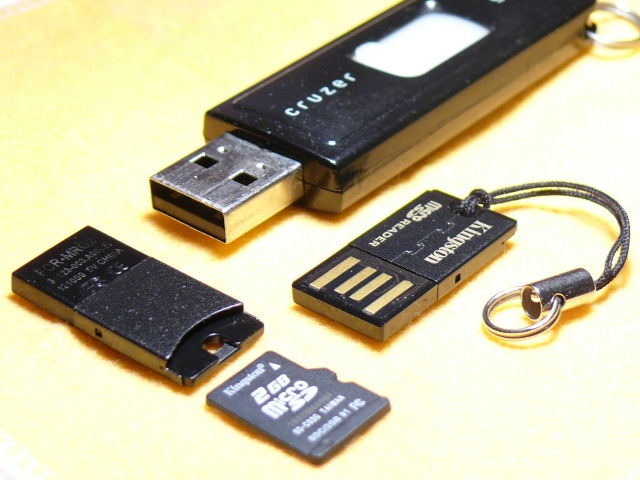
Here is a picture.
The microSD card is in the front, and there are two of the USB card readers right behind it (one is upside-down). In the back, for comparison of scale, I show a Sandisk Cruzer Micro USB stick.
These tiny little USB card readers are very nice, attractive, and very well built. You can see that the USB plug only has the inner part with the four contacts. They left off the rectangular metal shell that most USB plugs have.
The reader can be fastened to your key ring using the little nylon string that is tied into a small hole in the end. They have gone so far as to make the hole a little bit recessed, so you can still plug in the microSD card while the string is attached.
Overall, it is a beautiful design.
However, I am not a fan of the little nylon strings. I was hoping that I could use a metal fastener to attach this reader to my key chain. A metal fastener would not jiggle around or get tangled like the string would. And it would also keep the microSD card from dropping out and getting lost.
So I wrote a short note to the folks at Kingston.
Hi guys,
I am currently in the process of moving from SD cards to micro SD cards, and I just bought a few from Kingston. These came with some nice micro SD card readers (see the photo attached).
I have an idea that might make these readers better for some of your customers (and for those who do not need the change, it would be no worse than what you have now).
Your current design is just long enough so that an inserted micro SD card is flush with the back edge. You can tell that someone took some great care to design the slot where the little string goes, because it still fits when a card is inserted, and it provides a little bit of pressure against the card, to keep it from falling out.
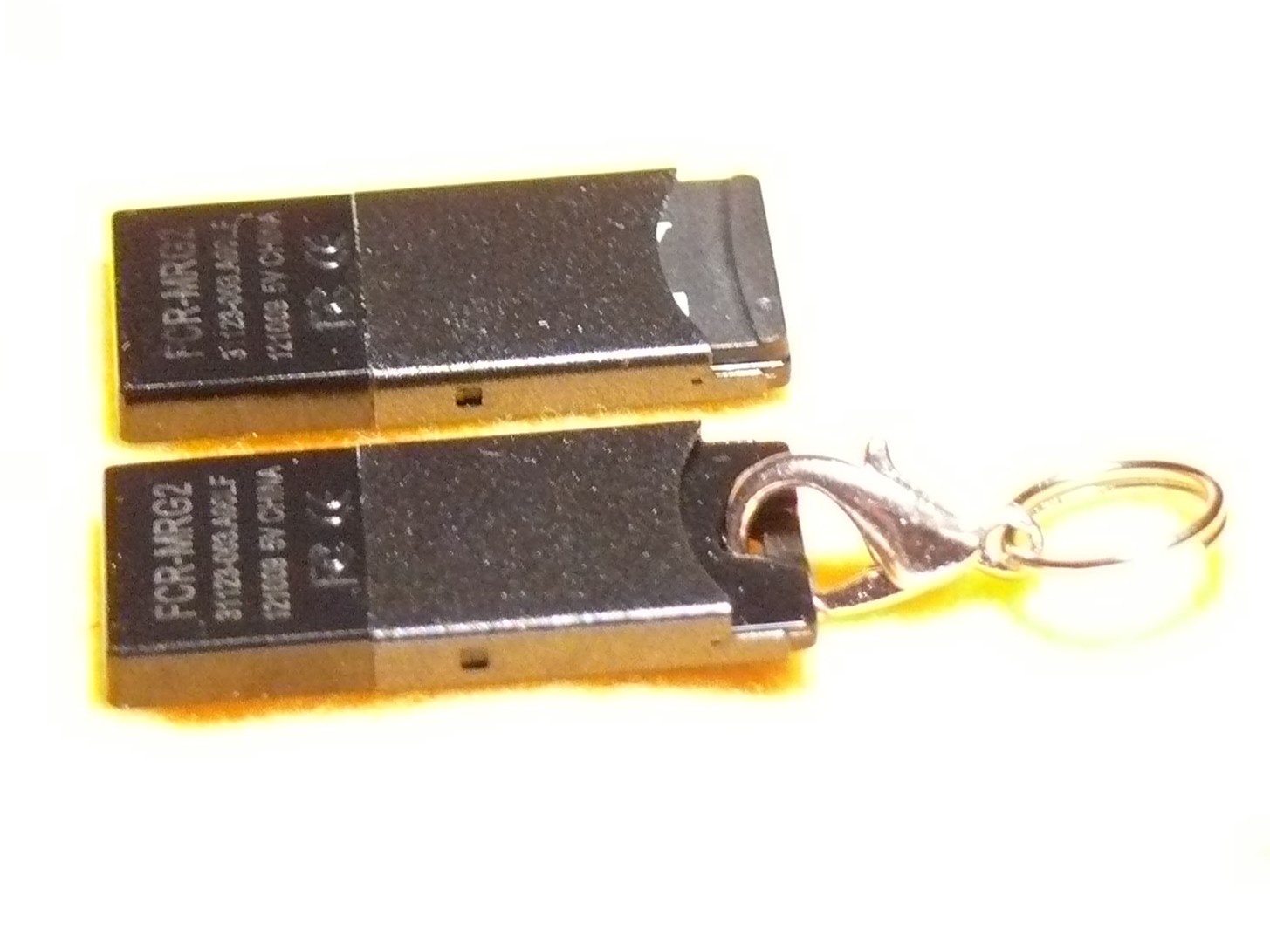
However, if the micro SD card reader were about 1.5 mm longer, the string hole would stick out past the end of an inserted micro SD card. That is, a card could be plugged in, and you could still see through the hole. This would make it possible to use other connectors besides the little strings. Personally, I like to use small split ring keyrings. Or like I have pictured here, you could use a crab claw clasp.
The little strings are a hassle on a keyring, especially since they are holding something so light in weight. The strings sometimes get tangled up in my keys. And the string does not really ensure that the card won’t slip out… it helps by adding some friction, but it does not BLOCK the card from coming out.
It’s something to consider. I hope you will. Your little reader looks to be the tiniest and most “robust” looking of the micro card readers out there. I think this little improvement would put it way over the top as the best reader to have.
Thanks, and all the best.
Alan Porter
I was very surprised when I received a reply from Kingston.
Dear Alan,
Thank you for your interest in Kingston Technology. Also, thank you for your input and suggestion for Kingston’s product line.
Kingston greatly values our customers’ opinions and insight. Unfortunately due to today’s litigious society, Kingston is forced to discard suggestions pertaining to new and future products. Therefore, we will be unable to move forward with your input and/or suggestion. We hope you understand our position.
If you have any other questions or require further assistance, feel free to contact us directly at 800 xxx-xxxx. We are available M-F, 6am-5pm, PT. I hope this information is helpful. Thank you for selecting Kingston as your upgrade partner.
Please include your email history with your reply
Best Regards,
xxxxxx xxxxxx
Customer Service/Sales Support
Kingston Technology Company
What a nice gesture… a personal thank-you note.
But what’s this part all about??
Unfortunately due to today’s litigious society, Kingston is forced to discard suggestions pertaining to new and future products.
I was shocked. They thanked me for writing, but they simply won’t allow themselves to listen to their biggest fans, because they’re scared that someone might sue them for listening.
What a horrible statement about our society! This is the exact polar opposite of the principles of sharing and feedback and continuous improvement that I am used to dealing with in the open source community.
Kingston lives in a feedback-free vacuum, fingers in their ears, and they blame us all for their uncooperative attitude. What does this say about us? Has the greatest nation in the world slowly grown old and senile, becoming scared of its own shadow? Will my children grow up to be scared to talk to strangers, scared to have a genuine dialog with another human, scared to actually accept criticism and suggestions, scared that someone would sue them, scared that they might tarnish their sacred brand? Is this the world that I want to leave to my children? Hell, no. So I made sure to write back to Kingston and register my disapproval of their spineless policy.
I hope some Chinese company will run with the elongation improvement. They don’t seem to be crippled by the imaginary legal threats from their own customers like Kingston seems to be.
I should note:
Personally, I hope we will begin to see less of this corporate (and personal) scaredy cat culture in America.
How many times have I gone outside in the morning, only to find that I had left my garage door open all night? Too many. I hate that uneasy feeling that I have just invited thieves into the garage for some easy pickin’s (truth be told, I’d be happy if they took some of that junk, but still).
For a long time, I had thought of rigging up a light upstairs that would come on whenever the garage door was open. That way, at night, it would be pretty obvious that I had left the door open. But I let that idea sit dormant for a long time.
Then I read an article in Make magazine (“12,000-Mile Universal Remote“, issue 30, page 66). In it, the author built a board called an “XBee Pulse I/O” that watched a door sensor, tapped the opener’s switch, and communicated with an XBee internet gateway. These talked to a cloud service called iDigi. This was not exactly what I wanted to do, but it pushed me in the direction I needed.
I decided that I wanted to build an Arduino board that would monitor my garage door. I wanted it to communicate with my home Linux server, “Bender”, which I consider to be sort of a digital butler, keeping track of stuff around the house and reminding me of stuff that I need to know.
For the next few weeks, I pondered how I would hook the Arduino board in the garage to Bender, which lives in the bonus room over the garage. I was not too fond of the idea of running a wire, even though the distance is very short. I scoured the internet for ZigBee boards, but soon decided that these were very pricey for what they did.
Inside the garage, I would need an “XBee” ZigBee radio module, which costs about $24~$40. But I would also need a controller board for another $10. This controller board acts as a front-end, providing a simple serial port to my project, and taking care of all of the ZigBee protocol stuff.
Then, on Bender’s end, I would need a similar XBee module ($24) and a USB adaptor ($20).
That’s a total of $78~$110, just for the wireless link!
Surely, dropping a Ben Franklin down for a home project is not such a big deal. But I was concerned that as my project grew, I might be adding many wireless links to it. And at $50 a pop, I figured it would be worthwhile to broaden my search a bit.
I worked for Ericsson from 1998 until 2003, when they were first developing the Bluetooth standard. I remember reading presentations about the technology before they had come up with the Bluetooth name… internally they referred to it as “MC Link”, and occasionally, (my favorite) “wireless wire”! I knew that the goal for Bluetooth was to make these communication chips so low-power and so cheap that every device would include one… WORLD DOMINATION!
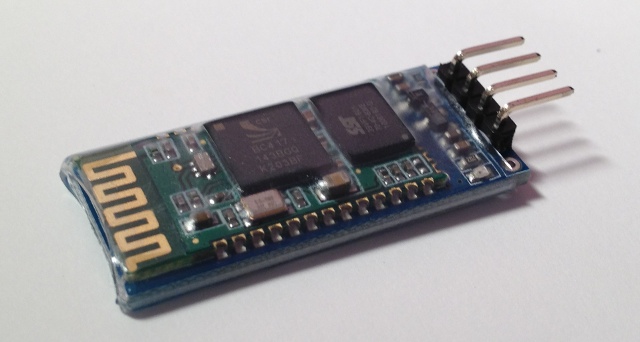
With that in mind, I wondered whether there were simple Bluetooth serial communication boards that would work with an Arduino. I found one, called the “BT2S” from Virtuabotix. It was only $15, and it looked pretty easy to use. AND… I would only need ONE on the garage monitor side, because I could use Bender’s existing Bluetooth interface!
I ordered two BT2S sticks from Virtuabotix. Later, I found another source for almost-identical boards. DealExtreme has the JY-MCU Arduino Bluetooth Wireless Serial Port Module for $8.60! (Be careful not to get the TTL version that looks very similar).
I am not too fond of crawling up a ladder to reprogram my Arduino in my garage, so I decided to make the Arduino end of this project as simple and generic as possible.
The BT2S module plugs in to the Arduino’s serial port, and the program on the Arduino simply listens for serial commands and responds. I decided to implement three commands: read digital, write digital and read analog. That way, nothing would be hard-coded into the Arduino. Instead, all of the smarts would be in the client program that runs on Bender.

Schematic
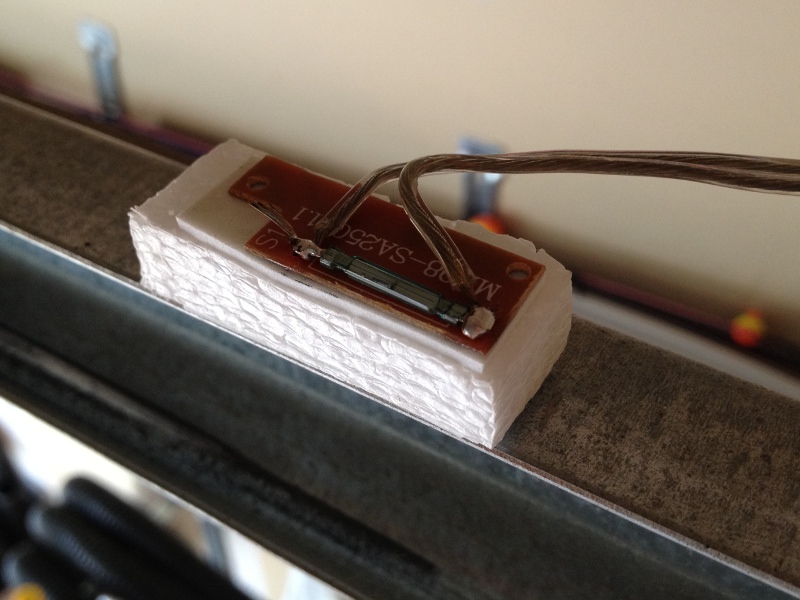
Reed switch.
I plugged in a magnetic reed switch to one of the digital inputs, and an LED to a digital output. While I was at it, I put a light sensor on one of the analog inputs.
Then I hung it up on the garage door frame. I stuck a very strong hard drive magnet on the door so it would be close to the reed switch whenever the door was open.
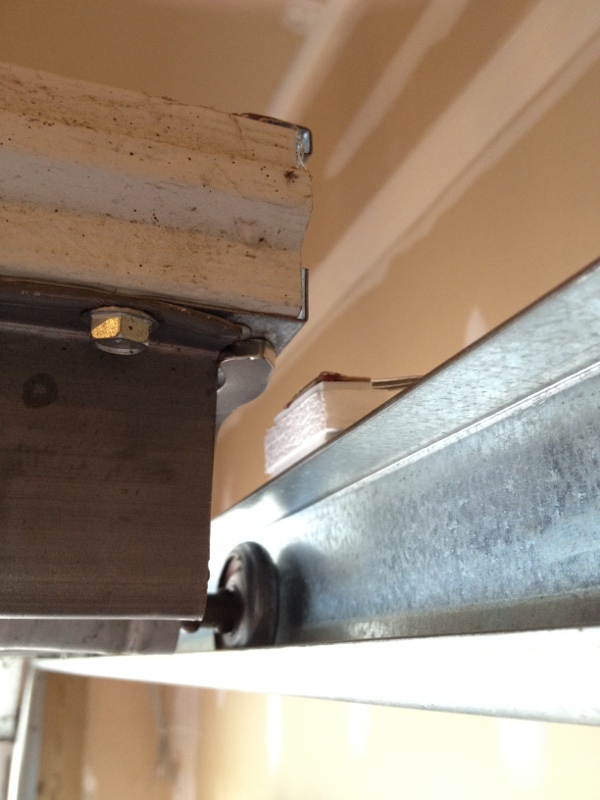
Door, magnet, reed switch.
Bender is a Linux machine, and so I needed a Linux-based program that would open a Bluetooth serial connection to the Arduino and then send serial commands to it. I needed a mixture of shell commands to configure the Bluetooth connection and low-level communication to the serial port. So I chose Python.
Bluetooth is a complex protocol that supports a lot of different uses: real-time audio, serial communication, keyboard/mouse, dial-up networking, and more. We’re using a simple serial link, which they call “rfcomm”. In Linux, we establish the serial link using the rfcomm command. It makes a Bluetooth connection to the device and creates a serial port device named /dev/rfcomm0.
Once we have created a serial device, the python program simply reads and writes to that device just like any other file. I structured my program as a big loop with timers. Every so-many seconds, it sends a command to read the magnetic reed switch. It also sends commands to blink the LED, so I can tell from the garage that the python program is still running. When the reed switch response comes back, it writes the door status to a file. If I put that file in an area that is shared via my web server (/var/www/ or $HOME/public_html/), I can check on my door from any browser.
If the door state has changed since the last time it was read, the python program sends a push notification (like a text message) to my phone. This is another idea that I stole from the same issue of Make magazine (“You’ve Got (Snail) Mail“, page 76). This uses an iPhone app called “Prowl” and a web service that goes along with it.
Sure, it’s cool to hear my phone “bling” when someone opens the door at home. But my original motivation was to be warned when I had left the door open.
Fortunately, that’s an easy job. I wrote a simple “cron” job that reads that status file at certain times of day (or night). If the door is open, it sends me another push notification saying “hey dummy, your garage door is still open!”.
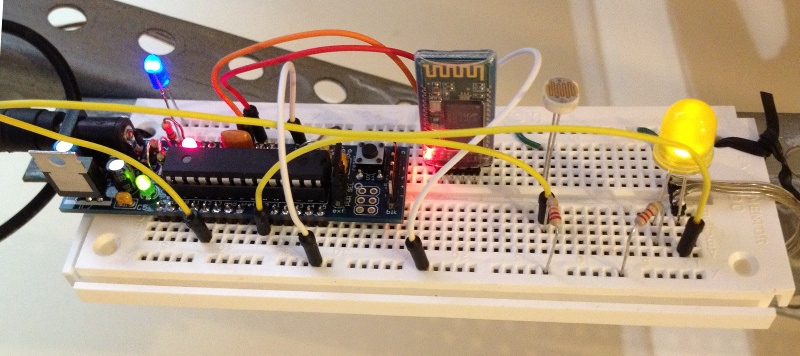
Breadboard, with “Boarduino” and BT2S, sensors and LEDs
Source code and other resources can be found on github.
Once again, it’s time for a weekend of frivolity and technology that we call “CarolinaCon”. While I was sure that doing so would put me on some secret list of persons-to-watch, I made plans to attend.
As usual, the Con spanned the weekend, from Friday evening until Sunday evening. Here’s my impressions.
FRIDAY EVENING
SATURDAY
SUNDAY
Thanks to the organizers and presenters for another memorable Con!
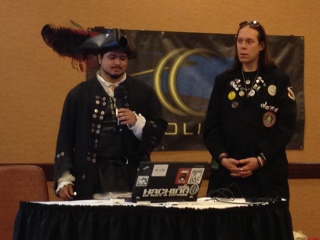
The Pirate and the Doctor discuss Byzantium
There seems to be a lot of confusion about the use of “sudo” vs using a root password. It’s a lot simpler than many make it out to be.
Some people argue about a Linux distribution’s default setting, when they could simply change the setting after installation and forget about it.
$ sudo passwd root$ sudo passwd -l root# apt-get install sudo
# adduser username sudo# gpasswd -d username sudo
# apt-get remove --purge sudo (optional)$ sudo -s (runs a normal shell)$ sudo -i (runs a login shell)Personally, I have gotten used to disabling my root password and the using either sudo -i or ssh root@hostname. That’s one less password for me to remember, and one less password that can be probed on the network.
But you don’t have to be like me… you do what feels right to you!
There seems to be a common misconception about Debian’s package manager “apt”, that the command “dist-upgrade” is used to upgrade to a new release. It is, but it isn’t. I wanted to clarify that here.
Basically, there are 4 things that you might want to do as part of upgrading a system.
apt-get update – updates the list of available packages and versionsapt-get upgrade – upgrade packages that you already haveapt-get dist-upgrade – upgrade packages that you already have, PLUS install any new dependencies that have come upThat means that to freshen up your packages to the latest versions on your current release, you should do “apt-get update && apt-get dist-upgrade“. On some systems that track “testing”, which changes often, I do this almost daily.
When you’re ready to “really upgrade” to a new release, you edit your sources files in /etc/apt/sources and change the release names. If the source lists contain proper release names, like “etch”, “lenny”, “squeeze” or “wheezy”; then you change these names to the new release that you want (see http://www.debian.org/releases/). If the source lists contain symbolic names like “stable”, “testing” and “unstable”, you do not need to change anything. When a new release is ready, the Debian people will change the symbols to point to the new release names. For example, right now, stable=squeeze and testing=wheezy.
Note 1 – “unstable” never points to a named release… it’s the pre-release proving ground for packages, used before are ready for inclusion in the testing release.
Note 2 – Don’t let these symbolic names fool you:
After your source lists look OK, you do the same thing you’ve always done: “apt-get update && apt-get dist-upgrade“”apt-get update && apt-get dist-upgrade“.
If you’re running Ubuntu, the release names are at http://releases.ubuntu.com/. And they’ve made a nice wrapper script called “do-release-upgrade” that basically edits your source lists and does the dist-upgrade for you (it also does some other nice steps, like letting you review the changes).
So there it is… fear not the “dist-upgrade”. In fact, most of the time, it is what you’ll want to run. It will make sure that you have all of the dependencies that you need.
I am a bit of a do-it-yourselfer. When looking for a new service like an online photo gallery, my first instinct is to find an open source package where I can host photos on my own web server. I know that many will skip this step and go directly to Picasa.
These days, it seems to come down to those choices: do it yourself, or give another slice of your life to Google. In this post, we’re going to do it ourselves.
Ever since the days of the Palm Pilot, I have made heavy use of the calendar application. When I switched to the iphone in 2009, I decided that I wanted to use a online calendar that I could access from my laptop and from the iphone. I looked at the open source world, and I found a package called DavICal, by Andrew McMillan in New Zealand. It uses the CalDAV protocol to exchange event information with clients like the iphone’s calendar, iCal on the Mac, Mozilla Thunderbird with the Lightning plug-in, Mozilla Sunbird, and (I think) Outlook.
Setting up the server is pretty well documented on the DavICal web site. On a Debian-based server, it’s a simple “apt-get” operation (after you add their site to your sources list).
Below, I will talk about how my calendars are organized, and then I’ll walk through the steps of setting up a new user and calendars on the server, and then setting up the iphone to access these new calendars.
How I organize my calendars
I organized my calendars in two groups, owned by users “alan” and “shared”. The “alan” user owns a set of calendars that I use, but that my family does not care about. The “shared” user is stuff that we all need to see. This might seem a little weird, but it makes things work out well on the iphone. Below is a picture of the iphone’s “calendars” screen, which shows this grouping. Notice the orange calendar called “meetings”. I have meetings at work all day, and my wife really doesn’t need to see them on her ipod, and she does not need to hear the reminders throughout the day. So the meetings calendar is owned by the “alan” user. On the other hand, we all need to know about family events (yellow), “his” stuff (blue) and “her” stuff (red). That stuff is owned by the “shared” user.
Below, when we set up the iphone calendar accounts, I will have two accounts (“alan” and “shared”), and my wife will only have one (“shared”). I am sure there are other ways to get the permissions to work out, but this is dead-simple, and it shows the division in the screen shot below.
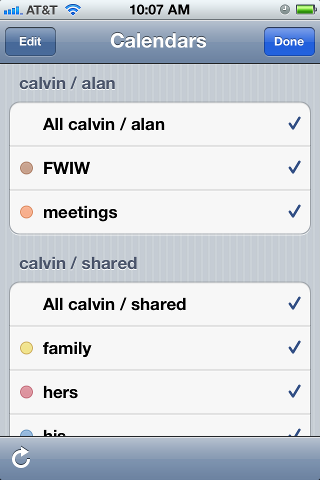
iphone calendar screen
In case you wondered, “calvin” is my server. And “FWIW” stands for “for what it’s worth”… stuff that I want to know about, but that I am not planning on attending. I want to know when Mardi Gras and Burning Man and DefCon are taking place, but I am not going to any of them.
On the server
We’ll start with the DavICal web interface, which is functional, but not very polished. You need a user account, and that user can own several calendars (called “collections”).
To create a user on the DavICal web interface, you need to log in as an administrator and use the menu to “create a principle” of type “person”. See? Precise, carefully worded, but not so user-friendly.
The new user can now add calendars by logging into the same web interface and selecting “User Functions” and “List My Details”. That screen shows a bunch of junk you don’t care about at the top. But at the bottom, there is a list of “collections”. That’s the CalDAV term for a calendar. Use the “Create Collection” button to make one or more calendars. Make sure to give them a “display name”. That’s the name that will show up in the iphone’s calendar list.
On the iphone
Once you have the calendars on the web system, the iphone part is easy. Go to “Settings”, “Mail, contacts, calendar”, and “add account” of type “other”. Select “CalDAV”. Enter four things:
Server=(the nostname of your CalDAV server)
Username=(your new user's name)
Password=(your password)
Description=(some name)
When you hit “next”, it may pop up a box complaining about SSL certificates. In my case, I don’t have proper SSL certificates, so we’re going to just say “continue”. Setting up SSL on the server is a future blog post. So we’ll say “continue”. At this point, you wait… and wait… for the iphone to guess all of the rest of the settings it can think of.
It will finally finish, and you’ll have to again tell it “don’t use SSL”. But surprisingly, it should have figured out the rest of the settings.
SSL=off
port=80
URL=http://USER@SERVER/caldav.php/USER
At that point, when you open the iphone’s calendar application, your server should show up in the calendar list, with all of the individual calendar names below it.
I am working from home today, which involves a combination of working locally on my laptop, but also remotely accessing some resources at the office. My current tool of choice for accessing the PC on my desk is VNC.
A note for Windows users — a VNC server on Windows will share the desktop session that is on your monitor. The default VNC server on Linux does not do this. Instead, it creates a brand new session that is completely independent of what’s on the monitor. If a Linux user wants the same experience that Windows users are used to, he can run “x11vnc”, a VNC server that copies the contents of whatever’s on the monitor and shares that with the remote user.
So when I access my PC remotely, I shell in to my desktop PC and I start a VNC server. I can specify the virtual screen size and depth, which is useful if I want to make it large enough to fill most of my laptop screen, but still leave a margin for stuff like window decorations. The command I use looks like this:
vncserver :1 -depth 32 -geometry 1600x1000 -dpi 96
This morning, when I started my VNC session, it responded with some errors about my fonts. Huh?
Couldn't start Xtightvnc; trying default font path.
Please set correct fontPath in the vncserver script.
Couldn't start Xtightvnc process.

21/02/12 10:40:55 Xvnc version TightVNC-1.3.9
21/02/12 10:40:55 Copyright (C) 2000-2007 TightVNC Group
21/02/12 10:40:55 Copyright (C) 1999 AT&T Laboratories Cambridge
21/02/12 10:40:55 All Rights Reserved.
21/02/12 10:40:55 See http://www.tightvnc.com/ for information on TightVNC
21/02/12 10:40:55 Desktop name 'X' (chutney:2)
21/02/12 10:40:55 Protocol versions supported: 3.3, 3.7, 3.8, 3.7t, 3.8t
21/02/12 10:40:55 Listening for VNC connections on TCP port 5902

Fatal server error:
Couldn't add screen
21/02/12 10:40:56 Xvnc version TightVNC-1.3.9
21/02/12 10:40:56 Copyright (C) 2000-2007 TightVNC Group
21/02/12 10:40:56 Copyright (C) 1999 AT&T Laboratories Cambridge
21/02/12 10:40:56 All Rights Reserved.
21/02/12 10:40:56 See http://www.tightvnc.com/ for information on TightVNC
21/02/12 10:40:56 Desktop name 'X' (chutney:2)
21/02/12 10:40:56 Protocol versions supported: 3.3, 3.7, 3.8, 3.7t, 3.8t
21/02/12 10:40:56 Listening for VNC connections on TCP port 5902

Fatal server error:
Couldn't add screen
I scratched around for a while, looking at font settings. Then I tried some experiments. I changed the dimensions from 1600×1000 to 800×600. Suddenly it worked.
Then I noticed that the VNC startup script makes some assumptions. If the VNC server can not start, it assumes that the problem is with the fonts, and it tries again using the default font path. In my case, the VNC server failed because I had specified a large screen (1600x1000x32) and there was already another session on the physical monitor. VNC could not start because it had run out of video memory.
So my solution? I had a choice. I could reduce the size or depth of the virtual screen, or I could kill the existing session that was running on my desktop.
Don’t believe everything you read. That error about the fontPath is misleading. The rest of the error message tells what’s going on. It could not start Xvncserver.
We try to visit our relatives in Malaysia about every two years. We were due a visit, and so we picked our December/January “track out” (school holiday) to make the trip.
We left right after Christmas, which presents its own challenges. But once we settled into our seats for the 16-hour flight from Detroit to Hong Kong, we left our holiday thoughts at home, and prepared for a whistle-stop tour across Asia.
Hong Kong
Our first stop was Hong Kong, where Foong’s sister Kim lives. Once again, we were impressed with their living quarters, a 700 sq ft 3-bedroom apartment on the 35th floor. Each time I visit, I wonder how I would go about “thinning out” enough to live in a place like that. Foong and I slept on the floor of their office/study/guestroom, with my feet touching one wall and my arm touching the opposite wall over my head. It was a tight squeeze for the two of us. The girls slept in their cousin’s bunk bed.
On Thursday morning, we had breakfast with a friend, Benjamin, who we knew from NC State University. We learned that Benjamin would be book-ending our trip, since he had just gotten a new job in Shanghai, and we would see him again in three weeks. Weird!
We spent most of Thursday touring a small island in Hong Kong called Cheung Chau. Getting there was half of the fun, since we had to go into downtown, and then take a ferry from Victoria Harbor to Cheung Chau. Once on the island, we rented bicycles and explored the beaches, the waterfront shops, and a rocky peninsula that even features a cave tunnel!
Macau
Our visit to Hong Kong was terribly short. On Friday, we boarded a “Turbo Jet” hydrofoil boat that took us to Macao. This weekend get-away was a convergence of three sisters and their families: our family from America, Kim’s family from Hong Kong, and Kit’s family from Shanghai. We spent most of Friday afternoon exploring the old area of town, the ruins of St. Paul’s Cathedral, and a museum of Macau history. That night, we went to the new casino area to see a show called “The House of Dancing Water” (which was remeniscent of shows like Cirque du Soliel). Then we walked around the Venetian Casino, which looks exactly like the one in Las Vegas.
Saturday was New Year’s Eve. Unfortunately, Sydney felt sick, and so she and I stayed in the hotel — she rested and I posted photos to our online photo gallery. Everyone else went to the Macau Tower, a sky-needle-like observation tower. The three kids, Audrey and Emily and John, walked on the “Skywalk”, a platform with no handrail, 764 feet over the city! (They were wearing harnesses). Then they visited a Panda zoo. We met again in the evening, where Foong took over the nurse duty with Sydney, and the rest of us went to downtown Macau for dinner and to see the New Year’s Eve celebration. We returned to the hotel in time to celebrate 2012 together.
Malaysia
On Sunday, said goodbye to Macao and boarded a plane for Malaysia. Thankfully, Sydney was feeling better for the trip. When we arrived, we had some time to relax at our in-laws’ house. In what seems to be the custom whenever I visit, I helped them install a new wireless router (the power lines there are noisy, and they have frequent thunderstorms, and so their electronics devices tend to get zapped fairly often). I set up their new router, and I took a lot of notes, sensing that I might be doing it again on our next visit.
On Monday, we just hung around their home town, Seremban. We had breakfast at their local neighborhood food court, and we visited Foong’s brother’s furniture store. We visited a few stores, but we really didn’t have any shopping to do. We were just soaking the place in.
Tuesday was also a nice quiet day around the house. The girls and I took advantage of the quiet time to read. We did get out a little, to see Foong’s old high school and some stuff downtown. We tried to get the girls to visualize what the town was like when their mother was a young girl.
Tioman Island
On Wednesday, we drove to the eastern shore of Malaysia to catch a ferry to Tioman Island. Tioman is a popular SCUBA destination for Singaporeans — at certain times of year — in December and January, they have strong ocean currents that stir up the water, making it too murky for diving. So this was definitely the off-season, and there were very few visitors. We finally arrived at the Berjaya Resort. The kids were excited because they got their own hotel room (long story).
On Thursday, we hired a driver to take us around the island in his 4WD truck. He drove up a steep and curvy road through the jungle and over the mountain, stopping to show us the sights like some dense jungle and a waterfall. We visited a sea turtle conservatory, and we fed their resident turtle, Jo. On the way back, the girls and I rode in the back of the truck (and I think the driver added a few more MPH to his driving). It was exhilarating. The last stop on our tour was a pier where you could look down on the tropical fish. We wrapped up the day with a swim at the hotel pool and dinner at the open-air restaurant, under the watchful eye of the resident monkeys.
On Friday, we explored the resort a little, and then packed up for the ferry ride back. We drove back to Seremban along some of the most sparsely-populated palm tree plantation land I have seen in Malaysia. In a moment of pure geek pride, I managed to help navigate from the back seat, using my Kindle on the local 3G network and Google Maps.
More Malaysia
Saturday was another stay-at-home day. The kids and I read books and I tinkered on the laptop, while Foong hung around with her sister and brothers. We celebrated Chinese New Year by stirring the traditional “Yusheng” salad, or “prosperity toss”.
On Sunday, we took our teen-aged nieces and nephews to Sunway Lagoon, a water park in Kuala Lumpur. We spent the entire day riding water slides and swimming in wave pools. After the park closed, the teenagers took a train back home, and we visited with several of Foong’s high school classmates who now live in Kuala Lumpur. We spent the night at one friend’s house.
On Monday, we met our niece Josephine, at her office. She works for L’oreal in Kuala Lumpur. It was nice for the girls to see the professional life of their cousin.
Tuesday was our last day in Malaysia, and we basically rested at home… and packed up suitcases… ugh.
Hangzhou
Wednesday started early at the airport. The flight was uneventful, but it took us some time to get oriented after we arrived. To get to town, you can take a bus or a taxi. But there are lots of guys hanging around the airport, offering to drive you around… I chose not to experiment with those guys. We eventually found our hotel near the West Lake of Hangzhou, and we had some time to explore the neighborhood on foot and to find some local food. I also challenged myself to find an electrical converter plug for my laptop — their plugs look like three prongs in a chicken foot pattern. \’/
It was kind of funny… that night and the next morning, the hotel room was very hot. I later learned that the thermostat did not really control anything, but that I could open a window to cool off (it was not obvious that the windows could open).
On Thursday, we walked around the lake area. I quickly decided that I needed to buy some gloves and maybe a hat. I bought gloves, and within 2 minutes of leaving the store, one thumb had started unweaving… Chinese quality! We found a place that rented bikes, and we rode around the lake. It was so cold, we decided to go into a museum to warm up a bit… nope, many public buildings in China are left unheated. It was as cold inside as it was out! That evening, we met two of Foong’s cousins, who are both living in Hangzhou. We saw one cousin’s apartment, and then we went to a very nice shopping mall for dinner.
Shanghai
On Friday, once again, it was time to move on. This time, we went to the train station, one of the busiest places we saw in China. Everyone was going somewhere for Chinese New Year. Fortunately, we found that the crowds thinned out considerably if you paid a little extra for a first class ticket. I suppose you’re paying extra for breathing room. Our train to Shanghai was fast, 300km/h (186mph)! Foong’s sister Kit has a driver who picked us up and brought us back to their palatial western-style home in Pu Dong. We picked up John at his school, a very posh British school. Then we took the kids to an indoor play-place, with slides and climbing areas… a nice way to get re-acquainted and burn off some energy. We had supper at their house.
On Saturday, we went to the 2010 World Expo center, where a couple of the countries’ exhibits remain open. The weather was cold and rainy, so it was hard to get into the proper mood for the Saudi roof-top “oasis” exhibit. From there, we went to a modern mall to warm up and browse and shop a little. I bought some nice sweaters (did you know that Chinese zippers are on the left side?). Dinner was “steamboat”, where each diner has a hot pot of broth, and they pick raw items to boil in their own soup mix.
Sunday’s surprise treat was a visit to the World Chocolate Wonderland, a museum devoted to chocolate. I was struck by the catchy jingle that played continuously in the exhibit hall, like an Asian answer to “It’s a Small World”… it’s still in my head! No trip to China would be complete without some shopping in the flea market stalls of Yuyuan, where you can find a wide assortment of cheap trinkets. It’s like DealExtreme.com, in person — you want a Hello Kitty USB flash drive? We finished off with dinner at a western-style restaurant that specializes in elaborate salads.
Monday was our last full day in China, and we spent the morning getting new eyeglasses. The mall had an entire floor devoted to optical shops, probably a hundred shops! What a bizarre bazaar! After lunch, we accepted the fact that our time in China winding down. We wandered another Chinese mall-of-bargains, wondering if we had any more room left in our suitcases. We bought some trinkets for our friends at home who had been looking after our fish and crab, and Foong found a nifty hard-shell iPad cover with a built-in bluetooth keyboard.
Remember Benjamin, who ate breakfast with us on our first day in Hong Kong? By this time, he had moved to Shanghai to start his new job, and so we invited him over for dinner on our last night in China.
Tuesday was a 36-hour day. Our flight left early, but we headed east while the sun headed west, and we met again in Detroit 13 hours later, but somehow still Tuesday morning. Weird.
–
All in all, it was a fun trip.
This one was different than previous Malaysia visits, because we spent just a couple of days in each place before moving on to the next. It might just be a trick of perspective, but I felt like the more interesting places were the ones that we had the least amount of time in. My favorite place, which I would always like to explore further, was Hong Kong.
The other thing that stands out about this vacation was the three distinct types of weather we encountered. Hong Kong was sunny and cool, Malaysia was just plain hot, and China was cold and wet. That combination made it hard to pack suitcases (and it also explains why Sydney and I have been coughing a lot since we got back). I might’ve enjoyed China more in a warmer season.
Now comes the hard part… returning to the daily grind after a month off. Someone remind me what I was doing before we left!
This is crazy.
I was trying to make an LVM snapshot of my home directory, and I kept getting this error:
$ lvcreate -s /dev/vg1/home --name=h2 --size=20G
/dev/mapper/vg1-h2: open failed: No such file or directory
/dev/vg1/h2: not found: device not cleared
Aborting. Failed to wipe snapshot exception store.
Unable to deactivate open vg1-h2 (254:12)
Unable to deactivate failed new LV. Manual intervention required.
I did some Googling around, and I saw a post from a guy at Red Hat that says this error had to do with “namespaces”. And by the way, Google Chrome uses namespaces, too. Followed by the strangest question…
I see:
“Uevent not generated! Calling udev_complete internally to avoid process lock-up.”
in the log. This looks like a problem we’ve discovered recently. See also:
http://www.redhat.com/archives/dm-devel/2011-August/msg00075.html
That happens when namespaces are in play. This was also found while using the Chrome web browser (which makes use of the namespaces for sandboxing).
Do you use Chrome web browser?
Peter
This makes no sense to me. I am trying to make a disk partition, and my browser is interfering with it?
Sure enough, I exited chrome, and the snapshot worked.
$ lvcreate -s /dev/vg1/home --name=h2 --size=20G
  Logical volume "h2" created
This is just so weird, I figured I should share it here. Maybe it’ll help if someone else runs across this bug.
 In 1995, I bought a puppy as a present for my wife, who was out of town for a few weeks. I wanted her to have a companion around the house while I was at work or on business trips, someone who could bark and warn her when there were noises in the yard.
I named her “Maggie”, and I set out to train her on the basics of living in a house.
When my wife got home, Maggie and I met her at the airport. I was disappointed to learn that she and I did not share the same enthusiasm for pet ownership. Making matters worse, Maggie seemed to be confused about this strange woman who had just shown up and taken all of my attention. This battle lasted for a couple of years. Unfortunately, the house-training exercises also took a couple of years.
Maggie stayed with us, and she eventually learned the difference between carpet and grass. She learned her place in the family. She became a constant companion. She reminded us to go outside and get some fresh air.
She moved with us to new places, including a year and a half in Singapore. She watched as our family grew, and she dutifully accepted her demotion with each new child. She slept on our bed, keeping us warm on cold winter nights, and reminding us not to sleep too late on Saturday mornings. She also kept our kitchen floor clean.
As she got older, she became less interested in fetching tennis balls and going for walks, preferring to stay inside, and enjoying her quality nap time. But every day, when I came into the driveway, she would look out the window to see who it was, and she would greet me as I came inside.
 A few months ago, she started showing the inevitable signs of age. I could sneak in without her hearing me. She sometimes needed help going up and down stairs. She fell off of the bed a couple of times, and so was demoted again — to a floor-sleeper. She started wearing diapers at night.
Shortly after her 16th bithday, Maggie grew weak, not wanting to get up to go outside any more. The vet confirmed that she only had a few more days with us. So I stayed with her at night, comforting her while she slept. And today, I worked from home so I could be next to her. This morning, while I worked, she quietly slipped away.
For 16 years, Maggie was a good dog, a close friend, and an essential member of the family. We are grateful that she chose to stay with us for all of that time. She will be sorely missed by all of us.
More photos of Maggie are in our photo gallery.